How to Activating and using your Swiss Travel Pass Flex?
Below you will find important information on activating and using your Swiss Travel Pass Flex.
Once you have ordered your Swiss Travel Pass Flex, you will receive a confirmation e-mail with a purchase receipt, which you must use to activate your selected travel dates.
Step 1: System Access & Ticket Retrieval
To initiate the activation of your travel dates, scan the QR code on your purchase receipt to reach the official portal, or visit activateyourpass.com to retrieve your valid transit documents.
Critical Protocol:Each individual travel day must be activated independently to ensure the validity of the pass for inspection.
Step 2: Credential Verification
Upon scanning the QR code, your passenger profile will be populated automatically. Simply select your intended travel dates and trigger the activation to generate your tickets.
If accessing the terminal manually, input the Reference Number found in your confirmation dispatch or receipt. Please ensure your First Name, Surname, and Date of Birth are entered in the standardized DD/MM/YYYY format before confirming your selection.
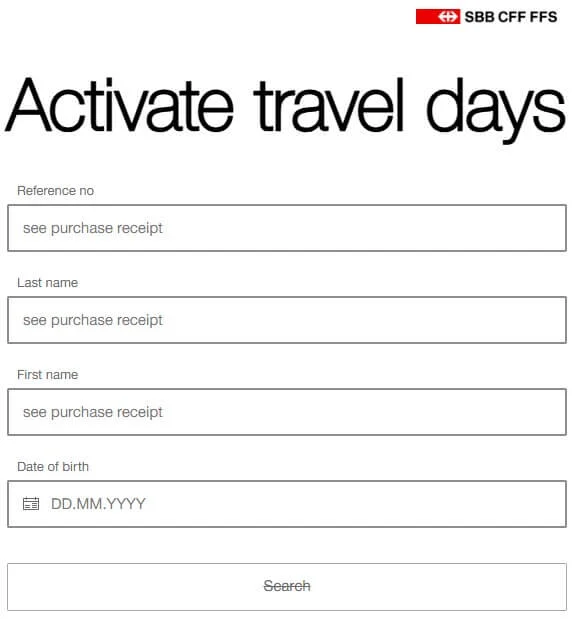
Step 3: Managing Flex Operations (Activation/Deactivation)
- Selection Process: Identify your desired travel window by clicking the relevant date. To reset a selection, click the date again.
- Confirmation Required: Every modification must be authorized by clicking “Activate/Deactivate Tickets”.
- Pre-Departure Deadline: Travel days must be activated prior to boarding. Once the day of travel has commenced, an activated ticket can no longer be deactivated or rolled back.
- Operational Lock: If a travel day is activated accidentally on the day of use, the system locks the entry. Our support team cannot override or reverse this action.
- Inventory: All active transit documents are stored under “My Tickets” and must be ready for inspection at any time.
Step 4: Presentation for On-Board Inspection
You have several standardized methods for presenting your active credentials to ticket inspectors:
- Digital Display (“Show Ticket”): Present the QR code directly on your mobile device for high-speed scanning.
- Physical Copy (“Print Ticket”): Documents may be printed on standard white A4 paper. Note that a separate physical copy is required for each individual travel day.
- Mobile Wallet (“Add to Wallet”): Integrate your tickets into your device’s native wallet app (standard on iOS; compatible third-party apps required for Android).
Technical Assistance: If you experience a signal failure or lack access to digital activation/printing services, please report to the nearest SBB station. The station authorities are authorized to provide manual assistance.